WeChat – The Most Popular Instant Messaging & Payment App in China
 WeChat is a super-popular instant messaging app in China, with over 1.36 billion users. However, it is far more than this. People use it to pay for all things from groceries to real estate, to take metro/city bus, to hail taxis, to book an entrance to scenic spots, to play games, to watch videos and more. It’s safe to say that WeChat encompasses almost every aspect of people’s daily life in China.
WeChat is available in various languages, including English, Korean, Japanese and so on. But some functions only support Chinese.
How Does WeChat Help Travelers to China?
1. Stay Connected
 WeChat is the main communication tool in China, as it’s free and real-time, like WhatsApp overseas. People in China prefer to communicate via WeChat rather than email or phone.
Once you add a WeChat friend, you can not only send messages, but also make voice or video calls, and share locations in real time. Moreover, the chat window includes a translation function, so you can communicate seamlessly with your local friends.
2. Make Payments
 How do I make a payment?
You need to link your bank card to the WeChat Wallet. Go to “Wallet”, tap “Bank Cards”, and select “Add Bank Card” and enter the required card information.
WeChat Pay supports several international card networks, including Visa, Mastercard, American Express, Discover Global Network, Diners Club, and JCB. However, only foreign credit cards are supported, while debit cards are not accepted. Friendly reminders:
a. If you register for WeChat using a new mainland China SIM card, you may not be able to link your hometown bank card. You are advised to register a China bank card using your China phone number and then register for WeChat if you plan to stay in China for a long time.
b. Make sure to turn 3-D secure & e-commerce ON.
c. If you are unable to link your bank card, you can update WeChat, switch networks, and retry. Or, you can try another bank card.
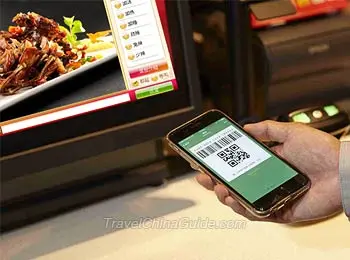
Payment Methods
Method 1: Scan the merchant’s QR code
(1). Tap the scan icon on the home screen, or tap the “+” icon in the top right corner.
(2). Select Scan.
(3). Scan the merchant’s QR code, input the money needs to pay, and confirm the payment by entering your password.
Method 2: Show your payment QR code
(1). Tap the “+” icon in the top right corner.
(2). Select Money or Pay/Receive.
(3). Show your payment QR code to the merchant so it can be scanned. Useful Tips:
(1). If you link an international bank card, a 3% service fee applies to single transactions over CNY 200 RMB. To avoid this fee, you can split the payment into multiple transactions.
(2). There is a limit of CNY 6,000 for single transactions, a cumulative limit of CNY 50,000 for monthly transactions, and a cumulative limit of CNY 60,000 for yearly transactions.
(3). WeChat Payment collaborates with UnionPay and supports several international e-wallets. It means users can make a payment directly through these e-wallets with no need to download the app.
You can check the supported e-wallets:
Cambodia: Bakong
Hong Kong, China: BoC Pay, Octopus, PayMe, Tap & Go
Malaysia: Boost
New Zealand: ICBC Pay
South Korea: NAVER Pay
Thailand: Bangkok Bank Mobile Banking, K PLUS
3. Easy Access to Public Transportation
To hail a ride, simply search for “Didi” in the search bar. To ride a shared bike, just scan the QR code on the bike. It’s a bit tricky to take the metro or bus via WeChat, and you’ll need to familiarize yourself with the names of the local transportation mini-program in advance, as the names of transportation mini-programs vary from city to city. 4. Book Attraction Tickets
This is especially useful in popular destinations like the Forbidden City, where prior booking is often required. However, most official WeChat accounts for tourist attractions only support Chinese.
5. Other Practical Functions
How do I set up a WeChat account?
Step 1: Registration Process
Download the latest version of WeChat through the app store or the WeChat Official website, and create an account in three ways: you can use your mobile phone number, which must be able to receive international SMS; alternatively, you can choose to sign up with an Apple ID or a Facebook account, but both require additional phone number verification.
Then you need to fill in basic information, including your full name, region, phone number, and a password. After that, you’ll pass security verification and receive an SMS authentication.
Plus, you also need to find a friend who is already a WeChat user, and ask him or her to scan the following QR code using WeChat to help you to verify. This person needs to meet the following requirements:
a. Signed up for WeChat over 6 months ago;
b. Has activated WeChat Pay;
c. Hasn’t completed “Help Friend Register” for other users in the past month;
d. Hasn’t been blocked in the past month.
Step 2: Complete Identity Verification
a. Tap “Me” at the bottom of the screen.
b. Tap “Services”, then enter “Wallet.”
c. Select “Identity Information.”
You will need to fill in personal details, upload a photo of your passport and complete face verification.
What if I can’t receive the verification code?
You can find the solution by following these steps.
a. Check if the country code is correct;
b. Switch Wi-Fi or mobile data and try again;
c. Make sure international roaming is enabled;
d. Wait 1-2 minutes to retrieve again.
 Further Reading:
A Complete Guide to Modes of Payment in China Guide to Alipay Chinese Currency & Money Exchange Cost of Traveling in China